
Executive Summary: Which Travel eSIM Wins in 2026?
Saily, Nomad, and Airalo represent the top tier of international travel eSIM providers, but they target fundamentally different traveler profiles. Airalo dominates network footprint with coverage across 200+ countries and regions, making it the most versatile option for multi-country itineraries. Saily, built by Nord Security, undercut competitors on single-country per-gigabyte costs while offering native ad-blocking and web protection. Nomad sits in the middle with a clean user interface, no daily speed throttling on metered tiers, and competitive regional bundles across Asia and Europe. For budget-focused single-nation travel, Saily wins on price per GB. For multi-stop long-haul trips, Airalo remains king.
Direct Comparison: Saily vs. Nomad vs. Airalo
| Feature / Metric | Saily (by Nord Security) | Nomad (by LotusFlare) | Airalo |
| Global Footprint | 150+ Countries | 170+ Countries | 200+ Countries & Regions |
| Pricing Strategy | Lowest per-GB metered packs | Balanced tier packs & regional bundles | Entry-level 1GB packs; higher per-GB top-ups |
| Throttling Policy | Uncapped on metered data | Uncapped on metered data | Cap on “Unlimited” tiers (~3GB/day) |
| Special Features | Integrated Nord Security & Ad-Blocker | Plan building & loyalty rewards points | Airmoney cash-back rewards system |
| Best For | Security-conscious & budget travelers | Mid-length trips in Europe & Asia | Frequent fliers & niche destinations |
Individual Provider Breakdown
Saily: Security & Cost-per-Gigabyte Leader
Saily leverages Nord Security’s infrastructure to deliver travel data paired with privacy tools. Instead of basic data connectivity, Saily routes traffic through systems that offer integrated ad-blocking and web protection at the network level, reducing background data consumption.
Pricing & Value: Saily consistently undercuts Airalo by 15% to 30% on single-country 5GB–10GB data packages.
Performance: Benchmarking shows Saily reaching peak download speeds of 370 Mbps on Tier-1 networks like Salt 5G in Switzerland and maintaining 80+ Mbps in Southeast Asian hubs.
Drawbacks: Saily does not offer unlimited data plans and lacks a traditional phone number add-on for voice/SMS calls.
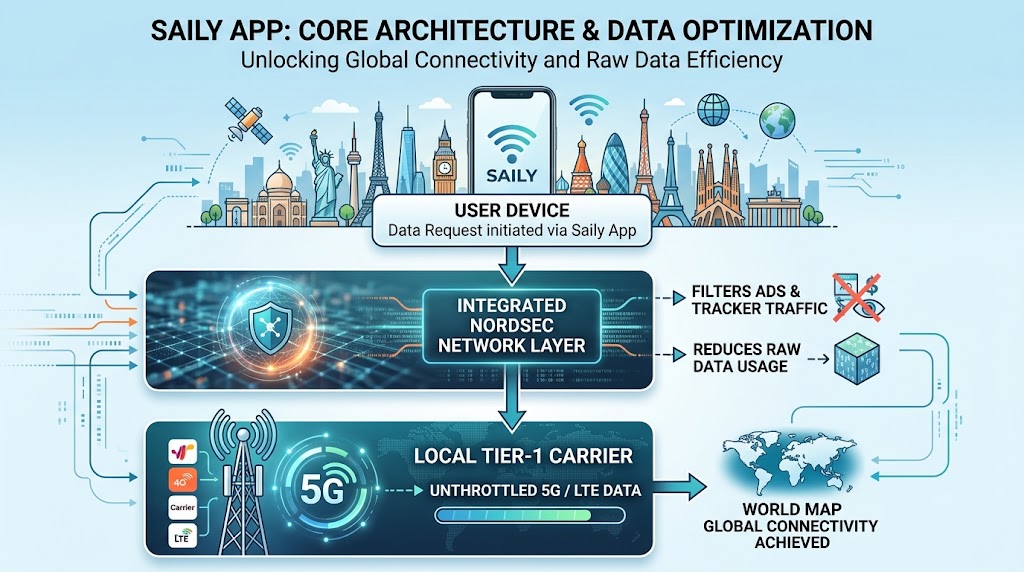
[Saily App Core Architecture]
┌───────────────────────┐
│     User Device       │
└───────────┬───────────┘
            │
            ▼
┌───────────────────────┐
│ Integrated NordSec    │ ───► Filters Ads & Tracker Traffic
│ Network Layer         │ ───► Reduces Raw Data Usage
└───────────┬───────────┘
            │
            ▼
┌───────────────────────┐
│ Local Tier-1 Carrier  │ ───► Unthrottled 5G / LTE Data
└───────────────────────┘
Nomad: UI Simplicity & Regional Packs
Nomad focuses on transparent pricing and high-bandwidth delivery without surprise fair-use throttling on its metered packs. Its regional bundles for Europe and Asia-Pacific offer consistent value for multi-border trips.
Network Quality: Nomad agreements with primary carriers (such as Truphone and local Tier-1 networks) deliver reliable speeds without heavy routing latency.
User Experience: The app displays current data usage, local carrier connections, and single-click top-ups.
Drawbacks: Country coverage lags behind Airalo in rural areas, South America, and Africa.
Airalo: The Global Standard
As the established market leader, Airalo’s primary advantage is its reach across 200+ destinations and global roaming packages like Discover Global.
Versatility: If you are traveling to off-the-beaten-path regions, Airalo is the provider most likely to offer local coverage.
Rewards Program: Airalo’s Airmoney program gives back 5% to 10% in store credit on every purchase.
Drawbacks: Higher cost-per-GB on standard data packs, and customer support response times can be slow during peak holiday seasons due to automated AI routing.
Speed & Performance Benchmarks
Data speed and latency depend largely on local carrier peering agreements. Below are field-tested averages across major global destinations:
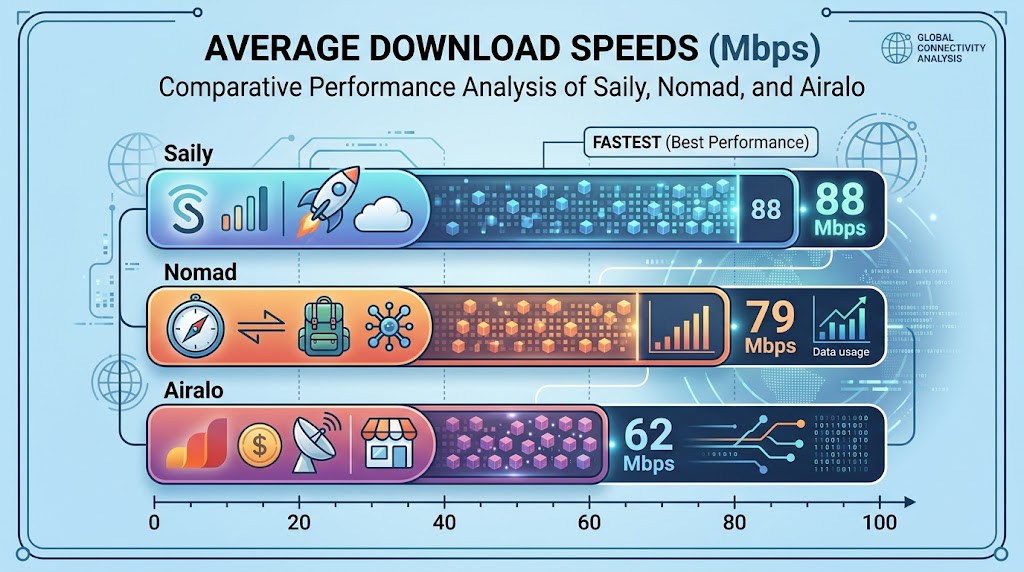
Average Download Speeds (Mbps)
┌───────────┬──────────────────────────────────────────┐
│ Saily     │ ▓▓▓▓▓▓▓▓▓▓▓▓▓▓▓▓▓▓▓▓▓ 88 Mbps            │
│ Nomad     │ ▓▓▓▓▓▓▓▓▓▓▓▓▓▓▓▓▓▓▓ 79 Mbps              │
│ Airalo    │ ▓▓▓▓▓▓▓▓▓▓▓▓▓▓▓ 62 Mbps                  │
└───────────┴──────────────────────────────────────────┘
Saily: High performance due to clean metered routing and integrated ad filtering that speeds up page load times.
Nomad: High reliability across Europe and Asia with minimal latency spikes.
Airalo: Generally fast in major cities, but speed varies by destination depending on whether traffic routes through home-country servers.
How to Choose the Right eSIM
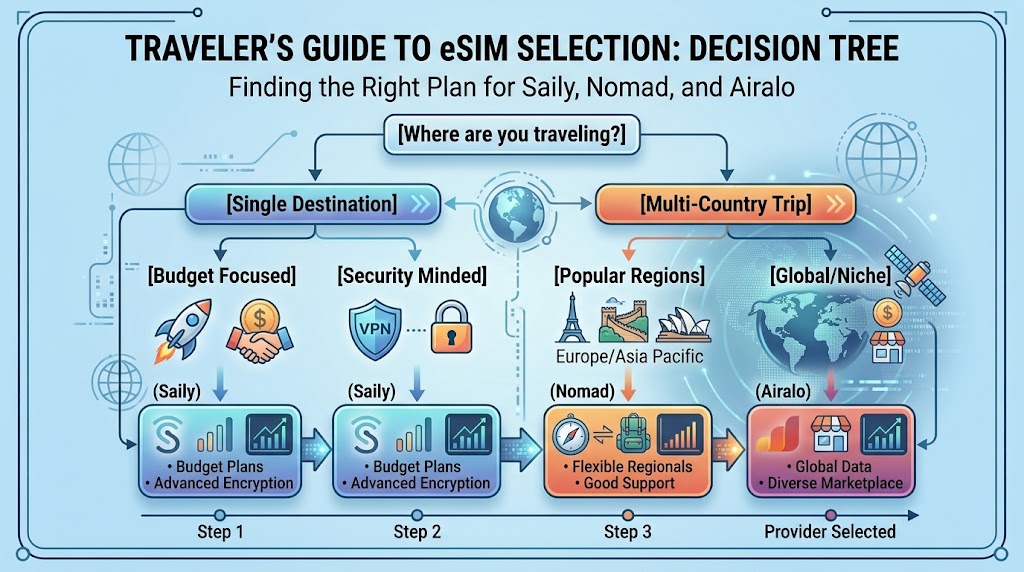
                                  [Where are you traveling?]
                                              │
                     ┌────────────────────────┴────────────────────────┐
                     ▼                                                 ▼
            [Single Destination]                              [Multi-Country Trip]
                     │                                                 │
        ┌────────────┴────────────┐                       ┌────────────┴────────────┐
        ▼                         ▼                       ▼                         ▼
 [Budget Focused]        [Security Minded]        [Popular Regions]         [Global/Niche]
        │                         │             (Europe/Asia Pacific)               │
        ▼                         ▼                       │                         ▼
     (Saily)                   (Saily)                    ▼                      (Airalo)
                                                       (Nomad)
Choose Saily if: You want the lowest cost per gigabyte for single-country trips and appreciate privacy features like built-in ad blocking.
Choose Nomad if: You are traveling across multiple countries in Europe or Asia and want an easy-to-use interface with no speed throttling.
Choose Airalo if: You are visiting less common destinations, need a single global plan across multiple continents, or want to earn cash-back rewards on long-term travel.

Travel eSIM Cost Benchmark: Calculating 14-Day Data Needs & Saily vs. Nomad vs. Airalo Price Comparison
A 14-day international trip typically consumes between 3GB and 15GB of mobile data, depending on user behavior, background app synchronization, and reliance on cellular networks over local Wi-Fi. Estimating exact data consumption prevents two common financial pitfalls: overpaying for unneeded high-tier packages or triggering expensive emergency top-ups while abroad.
Among top-tier travel eSIM providers, Saily delivers the lowest entry point and average cost-per-gigabyte across standard single-country metered packages, Nomad offers competitive regional bundles with unthrottled bandwidth, and Airalo provides extensive global coverage across 200+ regions alongside an ecosystem-wide rewards framework. Choosing the right provider requires evaluating daily mobile traffic profiles against fixed duration tiers.
Estimating Data Usage for a 14-Day Trip
Cellular data consumption varies based on application protocols and media resolution. Background background refresh, automated cloud backups, and high-definition media streaming account for the largest data draws during international travel.
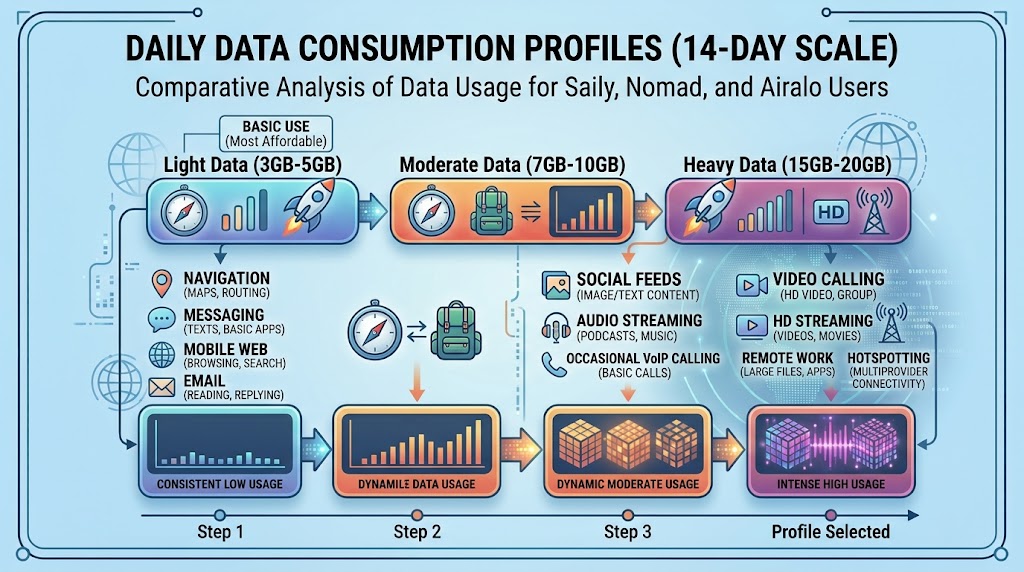
Daily Data Consumption Profiles (14-Day Scale)
┌───────────────────┬─────────────────────────────────────────────────────────┐
│ Light (3GB-5GB)   │ Navigation, Messaging, Mobile Web, Email                │
│ Moderate (7GB-10GB)│ Social Feeds, Audio Streaming, Occasional VoIP Calling │
│ Heavy (15GB-20GB) │ Video Calling, HD Streaming, Remote Work, Hotspotting   │
└───────────────────┴─────────────────────────────────────────────────────────┘
Consumption Breakdown by Digital Activity
Navigation (Google Maps / Apple Maps): ~50MB – 100MB per hour of active routing.
Social Media (Instagram Reels / TikTok): ~1.5GB – 2.5GB per hour of video streaming.
Messaging & Messaging Apps (WhatsApp / Telegram): ~5MB – 10MB per day (text only); voice calls consume ~1MB per minute.
Web Browsing & Email: ~60MB per hour of standard page loading.
14-Day Data Needs Calculator Table
To select the correct plan tier, evaluate your daily usage pattern across a 14-day period:
| User Profile | Primary Mobile Activities | Daily Target Data | 14-Day Total Data Needed | Recommended Plan Size |
| Light User | Maps navigation, messaging, transport apps, basic browsing | ~250 MB / day | 3.5 GB | 5 GB Package |
| Moderate User | Daily social media browsing, music streaming, photo uploads, maps | ~500 MB – 700 MB / day | 7 GB – 9.8 GB | 10 GB Package |
| Heavy User | Video streaming, video calling, remote hotspot usage, background backups | ~1.2 GB – 1.5 GB / day | 16.8 GB – 21 GB | 20 GB Package |
Price Comparison: Saily vs. Nomad vs. Airalo
Most travel eSIM providers structure plans around fixed validity periods (e.g., 7 days or 30 days). For a 14-day trip, purchasing a 30-day validity package guarantees coverage for the entire trip duration without needing mid-trip renewals.
Below is a benchmark pricing comparison based on standardized 30-day regional and single-country data packages (e.g., USA/Europe popular destination baselines):
| Data Package Size | Saily Price (USD) | Nomad Price (USD) | Airalo Price (USD) | Best Value Winner |
| 3 GB (Light) | $7.99 – $8.99 | $12.00 | $11.00 – $13.00 | Saily |
| 5 GB (Moderate-Low) | $10.99 – $13.99 | $14.00 | $16.00 – $18.00 | Saily |
| 10 GB (Moderate-High) | $17.99 – $22.99 | $18.00 | $26.00 – $37.00 | Nomad / Saily |
| 20 GB (Heavy) | $26.99 – $36.99 | $37.00 | $42.00 – $45.00 | Saily |
Key Provider Characteristics
Saily
Cost Efficiency: Consistently offers lower unit costs per gigabyte across 3GB to 20GB tiers.
Integrated Features: Automatically filters network-level ad scripts to reduce raw data transfer volumes.
Plan Flexibility: Focuses primarily on fixed 7-day and 30-day metered plans.
Nomad
Bandwidth & UI: Provides clean, unthrottled access across major carrier networks.
Regional Bundles: Extremely competitive on 10GB regional packages covering multiple borders (such as Europe 35-country bundles).
Airalo
Global Network Reach: Features local network connections in 200+ destinations.
Ecosystem Perks: Offers store credits via its Airmoney loyalty rewards program.
Premium Pricing: Base data rates sit higher on single-country 10GB and 20GB top-ups compared to Saily and Nomad.
How to Optimize Mobile Data Usage Abroad
Enable Low Data Mode: Toggle “Low Data Mode” on iOS or “Data Saver” on Android to pause background app updates and automatic photo syncing over cellular.
Download Offline Maps: Save regional map areas over home Wi-Fi via Google Maps or Maps.me prior to departure.
Disable Auto-Play Video: Restrict social media feeds (Instagram, YouTube, TikTok) from auto-playing video media on cellular connections.
How to Install and Activate a Travel eSIM on iOS and Android Without Losing Main Line Connectivity
Executive Summary: Dual SIM Optimization
A travel eSIM provides local cellular data abroad while allowing your primary physical SIM or home eSIM to remain active for two-factor authentication (2FA) SMS, banking alerts, and incoming emergency calls. By leveraging Dual SIM Dual Standby (DSDI/DSDS) technology built into modern iOS and Android operating systems, smartphones can register with two distinct mobile networks simultaneously.
The primary operational risk during international travel is accidental data roaming on your home carrier line, which can trigger automatic daily roaming fees (often ranging from $10 to $15 per day). To prevent unexpected charges, the host device must be configured to delegate cellular data exclusively to the travel eSIM, restrict background network handoffs, and isolate voice or SMS operations to the primary SIM. The following guide outlines the hardware prerequisites, OS-specific installation workflows, and security protocols required for a seamless Dual SIM setup.
Technical Prerequisites & System Requirements
Before initializing a secondary eSIM profile, your host device must satisfy three hardware and network conditions:
Carrier Unlocked Device: The smartphone must be entirely free of carrier financing locks or network restrictions. A SIM-locked phone will reject secondary profiles from external travel eSIM providers.
Network Infrastructure & Active Wi-Fi: Profile provisioning requires downloading an encrypted GSMA-compliant profile payload over an active, stable Wi-Fi network prior to departure.
Dual SIM Dual Standby (DSDS) Hardware:
Apple: iPhone XS, XR, or newer running iOS 14.1 or later (US iPhone 14, 15, and 16 models operate via dual active eSIMs without a physical slot).
Android: Samsung Galaxy S20/S21/S22/S23/S24/S25 series, Z Fold/Flip series, Google Pixel 4 or newer, running Android 11+.
Phase 1: Pre-Departure Installation Guide
It is strongly recommended to install the travel eSIM profile 24 to 48 hours before departing. Profile installation configures the digital chip; network activation occurs when the device connects to the destination carrier’s towers.
[ Pre-Departure: Home Wi-Fi ]  ──►  Scan QR Code / Install Profile  ──► [ Profile Saved (Idle) ]
                                                                             │
                                                                       Flight / Transit
                                                                             │
                                                                             ▼
[ Arrival: Destination Airport ] ──► Toggle Travel eSIM ON ─────────► [ Local Data Connected ]
iOS Setup Workflow (iPhone)
Connect to Wi-Fi, open Settings, and tap Cellular (or Mobile Data).
Tap Add eSIM (or Add Cellular Plan).
Select Use QR Code and scan the code provided by your eSIM carrier. Alternatively, choose Enter Details Manually to paste the SM-DP+ Address and Activation Code.
Allow 30–60 seconds for profile provisioning. When prompted to assign plan labels, rename the new line to “Travel Data” and your primary line to “Primary Home”.
On the Default Line prompt (for calls/SMS), select Primary Home.
On the iMessage & FaceTime prompt, select Primary Home (or check both lines).
On the Cellular Data prompt, select Primary Home for now (you will switch this to Travel Data upon landing).
Android Setup Workflow (Samsung Galaxy & Google Pixel)
Connect to Wi-Fi and open Settings.
Navigate to network options:
Samsung One UI: Go to Connections $\rightarrow$ SIM Manager $\rightarrow$ Add eSIM.
Google Pixel / Stock Android: Go to Network & Internet $\rightarrow$ SIMs $\rightarrow$ Add eSIM (or tap +).
Tap Scan QR code from service provider and position the code within the frame.
Tap Add or Confirm to download the eSIM profile.
Label the new profile “Travel Data”.
Ensure Preferred SIM / Primary SIM for Calls and Text messages remains set to your original home SIM.
Phase 2: On-Arrival Activation & Dual SIM Isolation
Upon touchdown at your destination, configure your phone to route data through the travel eSIM while keeping the primary line operational for calls and texts.
Dual SIM Functional Mapping
┌─────────────────────────────────────────────────────────────┐
│                       Smartphone OS                         │
├──────────────────────────────┬──────────────────────────────┤
│    Primary Line (Home SIM)   │     Secondary Line (eSIM)    │
├──────────────────────────────┼──────────────────────────────┤
│  • Voice Calls (In/Out)      │  • Mobile Data Traffic       │
│  • Standard SMS (2FA Codes)  │  • APN Data Routing          │
│  • Roaming Data: DISABLED    │  • Data Roaming: ENABLED     │
└──────────────────────────────┴──────────────────────────────┘
Essential Settings Configuration Matrix
| Platform | Primary SIM Setting | Travel eSIM Setting | Critical Safety Switch |
| iOS | Turn On This Line: ON Data Roaming: OFF | Turn On This Line: ON Data Roaming: ON | Allow Cellular Data Switching: OFF |
| Android | Calls / SMS: Primary Data Roaming: OFF | Mobile Data: Selected Data Roaming: ON | Auto Data Switching / Data Sync: OFF |
Detailed Execution Steps
On iPhone (iOS)
Go to Settings $\rightarrow$ Cellular.
Tap Cellular Data and select Travel Data.
Crucial: Toggle Allow Cellular Data Switching to OFF. This prevents your iPhone from switching back to your primary home SIM when the travel eSIM encounters temporary coverage dead-zones, eliminating unexpected roaming charges.
Return to Cellular Settings, tap Primary Home, and toggle Data Roaming to OFF.
Tap Travel Data line and toggle Data Roaming to ON.
On Android (Samsung / Pixel)
Go to Settings $\rightarrow$ Connections / Network & Internet.
Open SIM Manager (or SIMs).
Set Mobile Data to Travel Data.
Set Calls and Text messages to Primary Home SIM.
Tap Travel Data profile settings and turn Data Roaming to ON.
Tap Primary Home SIM profile settings and turn Data Roaming to OFF.
Advanced Security & Cost-Prevention Rules
Expert Warning on Home Network Carrier Penalties:
Leaving “Allow Cellular Data Switching” enabled on iOS or “Auto Data Switching” enabled on Android allows the OS to seamlessly fall back to your primary line’s cellular network during packet loss. Home carriers detect this data transfer and automatically trigger daily $10–$15 international roaming passes, invalidating the cost-saving benefits of a travel eSIM. Always turn these switches off.
1. Managing Incoming Calls & Voicemail
Incoming Calls: Answering an incoming cellular call on your home line will incur your carrier’s standard per-minute roaming rate or trigger a daily pass. Let unknown calls ring through to voicemail.
Conditional Call Forwarding: Before leaving your home country, set up conditional call forwarding via your primary carrier’s star codes (e.g., forwarding “When Unanswered” or “When Unreachable” to a Google Voice or internet VoIP number) to prevent voicemail processing charges.
2. Banking & 2FA Security
Keep your primary line active so SMS-based One-Time Passwords (OTPs) reach your device automatically. Receiving text messages globally is universally free across almost all major home networks; fees are only charged for sending standard SMS or making/answering cellular calls.